
Export Facebook Comments to CSV, Excel & JSON — Free Tool
Paste a Facebook post URL and download every comment and threaded reply in seconds — no coding, no Facebook API key.
Newly launched · Supports Pages, Videos & Reels · Includes threaded replies
Newly launched · Supports Pages, Videos & Reels · Free tier with no credit card required
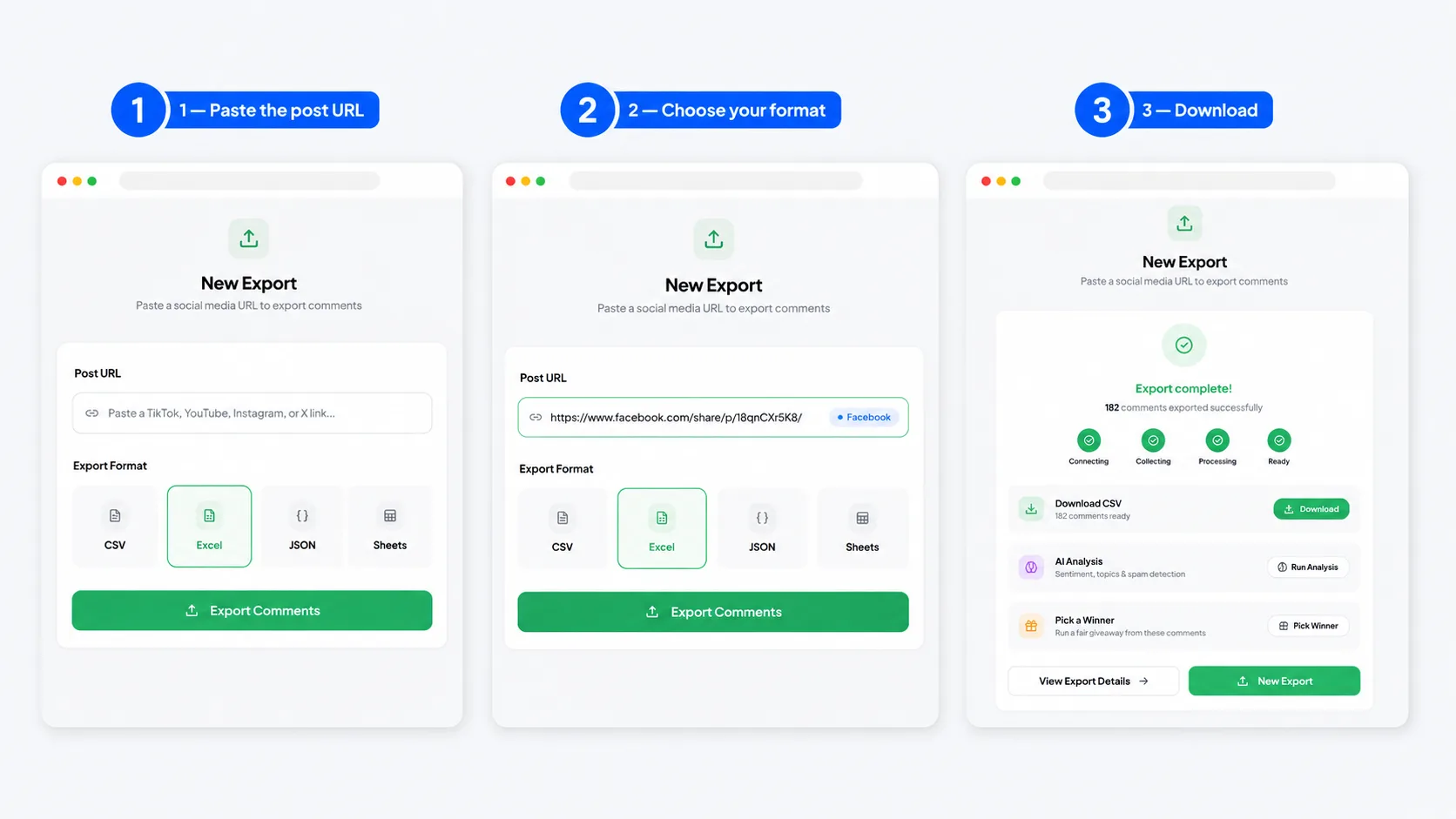
How to export Facebook comments (3-step process)
Learning how to export Facebook comments takes about a minute. There's no spreadsheet copy-paste, no scraper script to maintain, and no Meta developer application to wait on. Paste a URL, pick a format, download.
- 1
Paste the Facebook post URL
Copy the link to any public post, Page post, video, or Reel — then paste it in. The exporter validates the URL and queues the comment fetch. Share links (facebook.com/share/...) work too; we resolve them automatically.
- 2
Choose your format
CSV is free. Creator unlocks Excel (.xlsx) and JSON. Every export includes the comment text, author name, reaction count, reply count, timestamp, and the parent ID that preserves threading.
- 3
Download and analyze
Your file is ready in seconds. Open it in Excel or Google Sheets, or run it through AI sentiment analysis to sort thousands of comments into positive, negative, and neutral automatically.
Want to skip the copy-paste entirely? Install the Chrome extension for one-click exports — it adds an Export button directly onto Facebook posts.
Supported content types — Pages, Groups, Reels, and Live videos
Facebook has more comment surfaces than any other platform, and they don't all behave the same way. Here's exactly what this Facebook comment scraper handles today — and what it doesn't, stated plainly so you're not surprised.
Public Page posts
The core use case — any post on a public Facebook Page, including yours and competitors'.
Public video posts
Standard videos and watch links export their full comment thread, replies included.
Facebook Reels
Paste a Reel link; we resolve it to the underlying post and pull every comment.
Public Group posts Beta
In beta. Works for many public Groups (and private Groups you're a member of); coverage is still expanding.
Facebook Live comments Beta
Coming soon. Once a Live ends and becomes a video, its comments export normally; real-time capture isn't live yet.
Marketplace listing comments Not supported
Not supported. Marketplace uses a separate messaging surface we don't read.
Private profile comments Not supported
Never supported. We only read publicly visible content and won't bypass privacy settings.
We'd rather under-promise here. If you try to export comments from Facebook content we can't reach — a private profile, a Marketplace thread — you get a clear error, not a half-broken file. Facebook page comment export and public video export are the most battle-tested paths.
What's included in each export
Every export is one comment per row, with replies linked back to their parent so the thread structure survives. These are the columns you get when you download Facebook comments with this exporter.
Columns in every row
comment_idparent_comment_idauthor_namecomment_textreaction_countreply_counttimestamppost_url
Top-level comments leave parent_comment_id empty. Replies fill it with the parent's comment_id, so you can rebuild the entire thread tree with a single join — threading is never flattened away.
Sample row
A single comment, as exported:
The reaction_count is the combined total of all reaction types Facebook shows on the comment, and timestamp is ISO 8601 in UTC.
Export formats: CSV vs Excel vs JSON
All three carry the same data. Pick the one that matches what you'll do next.
CSV (free)
Universal. Opens anywhere — Excel, Google Sheets, Numbers, pandas, R. Choose CSV when you want Facebook comments to CSV for a quick spreadsheet import or hand analysis.
Excel (.xlsx)
Keeps emoji and non-Latin scripts intact and arrives formatted. Export Facebook comments to Excel when you're building a report to share with non-technical stakeholders.
JSON
Replies nested under each parent comment. Best for developer use — feeding an API workflow, a sentiment-analysis pipeline, or a BigQuery load.
Quick rule: spreadsheet work → CSV or Excel; writing code → JSON. You can re-export the same post in another format any time without spending a fresh credit.
Why export Facebook comments?
The comment text is where the signal lives — and Facebook's native tools won't hand it to you in a usable file. A Facebook comment downloader turns a wall of replies into a dataset you can actually work with.
Brand monitoring & reputation management
Pull every comment on your latest announcement to catch complaints, refund requests, or PR flare-ups within hours instead of days.
Sentiment analysis for product launches
Export the comments under a launch post and score them so you can quantify reception — not guess from the loudest three replies.
Giveaway audit trails
Keep a timestamped record of every eligible comment so a winner draw is defensible if an entrant cries foul. Save it for 90 days.
Customer support insights
Mine public comments on support-heavy posts for recurring questions, then turn the top ten into a pinned FAQ or help-center article.
Academic & market research
Build a clean dataset of public opinion on a topic, brand, or event for coding, analysis, and citation in a reproducible format.
Compliance archiving
Regulated industries can archive public comments on official posts to satisfy record-keeping obligations, with stable IDs and timestamps.
Try it free — 25 exports per month, no credit card required. Save your first Facebook export in under a minute.
Facebook's comment export policy — what's allowed
Fair question to ask before you scrape Facebook comments. Here's how we handle it, in plain English — no dodging.
Public comments on public posts are fair to export
A comment on a public Page post is data anyone can already see. Reading it isn't different in kind from scrolling the post yourself — we just capture it into a file instead of your eyes.
We don't bypass privacy settings or touch private content
Private profiles, friends-only posts, and hidden comments are off-limits, full stop. If content isn't publicly visible, the export returns empty rather than attempting any workaround.
We respect Meta's rate limits
Our fetcher paces requests and backs off on errors instead of hammering Facebook. No millions-of-requests-per-minute behavior that would degrade the platform or trip abuse defenses.
We don't store your comment data beyond your session
The exported file is yours. We don't retain a copy of the comment text after your export completes, and you're responsible for handling the personal data inside it under Meta's Terms of Service, GDPR, and CCPA. If you're running a promotion, Meta's promotion rules apply — see Meta's compliance checklist, which covers Facebook as well as Instagram.
Pick a random winner from Facebook comments
Running a Facebook giveaway? Export every comment, dedupe by author, apply your rules (must tag a friend, must answer the question, exclude obvious spam), then draw a winner with a seeded random pick anyone in your audience can verify. No scroll-and-pause, no accusations of rigging.
The mechanics are the same whether the prize draw runs on Facebook or Instagram, so the workflow transfers directly. If you're new to fair draws, start with the full giveaway playbook and make sure you understand the sweepstakes vs giveaway legal differences before you publish your rules.
Running a Facebook giveaway this week?
Use the dedicated Facebook comment picker to draw a verifiable winner straight from the post URL. Our step-by-step guide on how to pick a random Facebook giveaway winner walks through exporting entries, filtering ineligible comments, and producing a public proof URL. For cross-platform campaigns, the Instagram giveaway winner picker runs the identical draw on Instagram posts — handy when one giveaway spans both networks.
Bulk export & API access for agencies
The free tool handles one post at a time. Teams running social listening across dozens of Pages need a different workflow.
Batch multiple URLs
Queue many Facebook posts back-to-back on unlimited-export plans, instead of pasting one link at a time.
Scheduled exports
Pin a post and re-pull its comments on a schedule to watch sentiment shift after a launch or ad campaign. Creator monitors 3 posts, Pro 20, Agency unlimited.
API access with webhooks
The Agency plan exposes a REST API at up to 60 requests/minute. POST a Facebook URL, get a webhook when the export is ready — wire it into Make, Zapier, n8n, or your own backend.
White-label client reporting
Export white-label CSVs with your agency's branding and onboard 10 analyst seats without sharing one login.
AI-powered sentiment analysis on exported Facebook comments
A spreadsheet of 2,000 Facebook comments isn't insight on its own — someone still has to read it. Send any export through our AI pipeline and skip that step.
- Per-comment sentiment label (positive / negative / neutral)
- Per-post sentiment score (–1 to +1)
- Trending topics extracted automatically
- Spam and bot-comment detection with a confidence score
- Plain-English summary of overall audience reaction
- Sentiment delta vs. your previous exports
The same pipeline powers our other exporters — see how it works for the Instagram comment exporter, the TikTok comment exporter, and the YouTube comment downloader.
Limits, pricing & free tier
No surprises. Here's exactly what each plan includes.
| Plan | Price | Exports | Comments / export | Formats | AI analyses |
|---|---|---|---|---|---|
| Free | $0 | 25 / month | 300 | CSV | 3 / month |
| Starter 3-day pass | $3 one-time | Unlimited (3 days) | 1,000 | CSV, Excel, JSON | 50 |
| Creator | $9 / month | Unlimited | 5,000 | CSV, Excel, JSON | 50 / month |
| Pro | $19 / month | Unlimited | 20,000 | All + Google Sheets | Unlimited |
| Agency | $49 / month | Unlimited | 50,000 | All + API + 10 seats | Unlimited |
Just need data for one campaign? Starter is a one-time $3 charge for 3 days of unlimited exports — no subscription. You can compare plans in full; yearly billing on Creator, Pro, and Agency saves 25%.
Frequently asked questions
What marketers and analysts ask before their first Facebook export.
How do I export comments from a Facebook post?
+
How do I export comments from a Facebook post?
+Copy the post's URL from your browser's address bar (or the post's “⋯ → Copy link” menu), paste it into the box at the top of this page, and click Export Comments. After a free signup you choose CSV, Excel, or JSON and download the file. The whole flow takes under a minute — no script, no Facebook developer account.
Can I export comments from a Facebook Group?
+
Can I export comments from a Facebook Group?
+Group export is in beta. Posts in public Groups, and in private Groups where your logged-in account is a member, are the target — but we're still validating coverage across Group layouts, so we don't promise it for every Group yet. Public Page posts, videos, and Reels are fully supported today.
Does the export include threaded replies?
+
Does the export include threaded replies?
+Yes. Replies come through as their own rows, each carrying a parent_comment_id that links back to the top-level comment. You can flatten the data for a quick read or rebuild the full reply tree with one join — threading is preserved either way.
Can I export comments from a private Facebook profile?
+
Can I export comments from a private Facebook profile?
+No. We only read what Facebook already shows publicly. Comments on a private profile, a friends-only post, or any content behind privacy settings are never accessible, and the export will return an empty result rather than attempt to bypass anything.
Is exporting Facebook comments legal?
+
Is exporting Facebook comments legal?
+Exporting public comments from public posts is broadly defensible. In the US, courts have repeatedly held that accessing public web data isn't a Computer Fraud and Abuse Act violation (hiQ v. LinkedIn, 2022). You're still responsible for how you use personal data under GDPR and CCPA — don't dox, spam, or re-target people without a lawful basis.
How many comments can I export per post?
+
How many comments can I export per post?
+Free: 300 per export. Starter ($3 for 3 days): 1,000. Creator: 5,000. Pro: 20,000. Agency: 50,000. Most Facebook posts have well under 5,000 comments, so the Creator plan covers the large majority of giveaways and analyses.
Can I export comments from Facebook Live videos?
+
Can I export comments from Facebook Live videos?
+Live comment export is on the near-term roadmap, not live yet. Once a Live broadcast ends and becomes a regular video, its comments fall under standard video export, which is supported. Real-time capture during a broadcast isn't available today.
What format are the exported Facebook comments in?
+
What format are the exported Facebook comments in?
+CSV on the free plan; Excel (.xlsx) and JSON unlock on Creator and above. CSV and Excel open in any spreadsheet; JSON nests replies under their parent comment for code and API workflows.
Does the export include reactions and reaction counts?
+
Does the export include reactions and reaction counts?
+Yes. Each row includes a reaction_count — the total reactions on that comment (Like, Love, Haha, and the rest combined), exactly as Facebook displays it publicly. That's the field most teams sort by to find a post's most-resonant comments.
Can I export Facebook Reels comments?
+
Can I export Facebook Reels comments?
+Yes. Paste a Reel URL (facebook.com/reel/... or a share link) and the exporter pulls its comments the same way it handles a standard post — replies and reaction counts included.
How is this different from manually copying comments?
+
How is this different from manually copying comments?
+Manual copying loses the structure: you get text but no reaction counts, no timestamps, no reply threading, and no stable comment IDs. It also caps out fast — nobody hand-copies 800 comments. The exporter captures every field in one file you can sort, filter, and analyze.
Do I need a Facebook account or API key?
+
Do I need a Facebook account or API key?
+You don't need a Facebook developer API key or Meta app review. You'll create a free ExportComments account (the signup gate), then paste a public post URL — that's it.
Can I run sentiment analysis on the exported comments?
+
Can I run sentiment analysis on the exported comments?
+Yes. Every export can be sent through our AI pipeline, which labels each comment positive, negative, or neutral, extracts trending topics, and flags likely spam. Free includes 3 analyses per month; Creator includes 50; Pro and Agency are unlimited.
How does this compare to Meta Business Suite's data export?
+
How does this compare to Meta Business Suite's data export?
+Meta Business Suite only exports data for Pages you own and manage, and its comment data is limited and slow to pull. This tool works on any public post — including competitors' Pages and posts you don't admin — and gives you the raw comment text in a clean spreadsheet, which Business Suite doesn't.
Start exporting Facebook comments today
25 free exports per month. CSV included. No credit card, no Facebook API key. Save your first export in under a minute.
Also export comments from Instagram · TikTok · YouTube · X / Twitter